> ## Documentation Index
> Fetch the complete documentation index at: https://sitespeak.ai/docs/llms.txt
> Use this file to discover all available pages before exploring further.
# Connect to an External MCP Server
> Connect your AI agent to remote MCP servers to access external AI tools and capabilities.
The MCP Server (SSE) action allows your AI agent to connect to remote Model Context Protocol servers, enabling access to external AI tools and capabilities.
 ## Adding the MCP Server Action
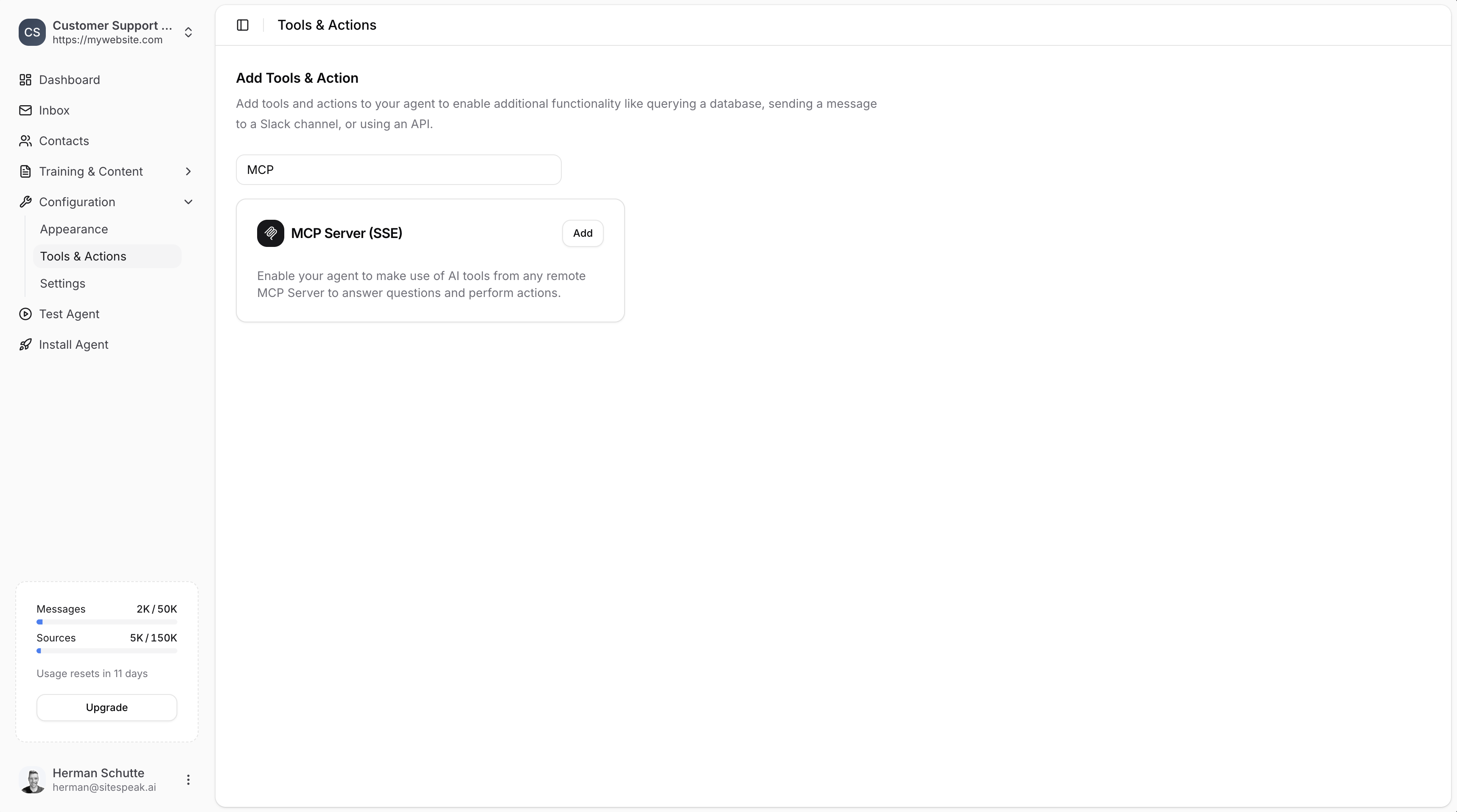
In your chatbot dashboard, go to **Configuration → Tools & Actions**.
Find **MCP Server (SSE)** and click **Add**.
***
## Configuration
## Adding the MCP Server Action
In your chatbot dashboard, go to **Configuration → Tools & Actions**.
Find **MCP Server (SSE)** and click **Add**.
***
## Configuration
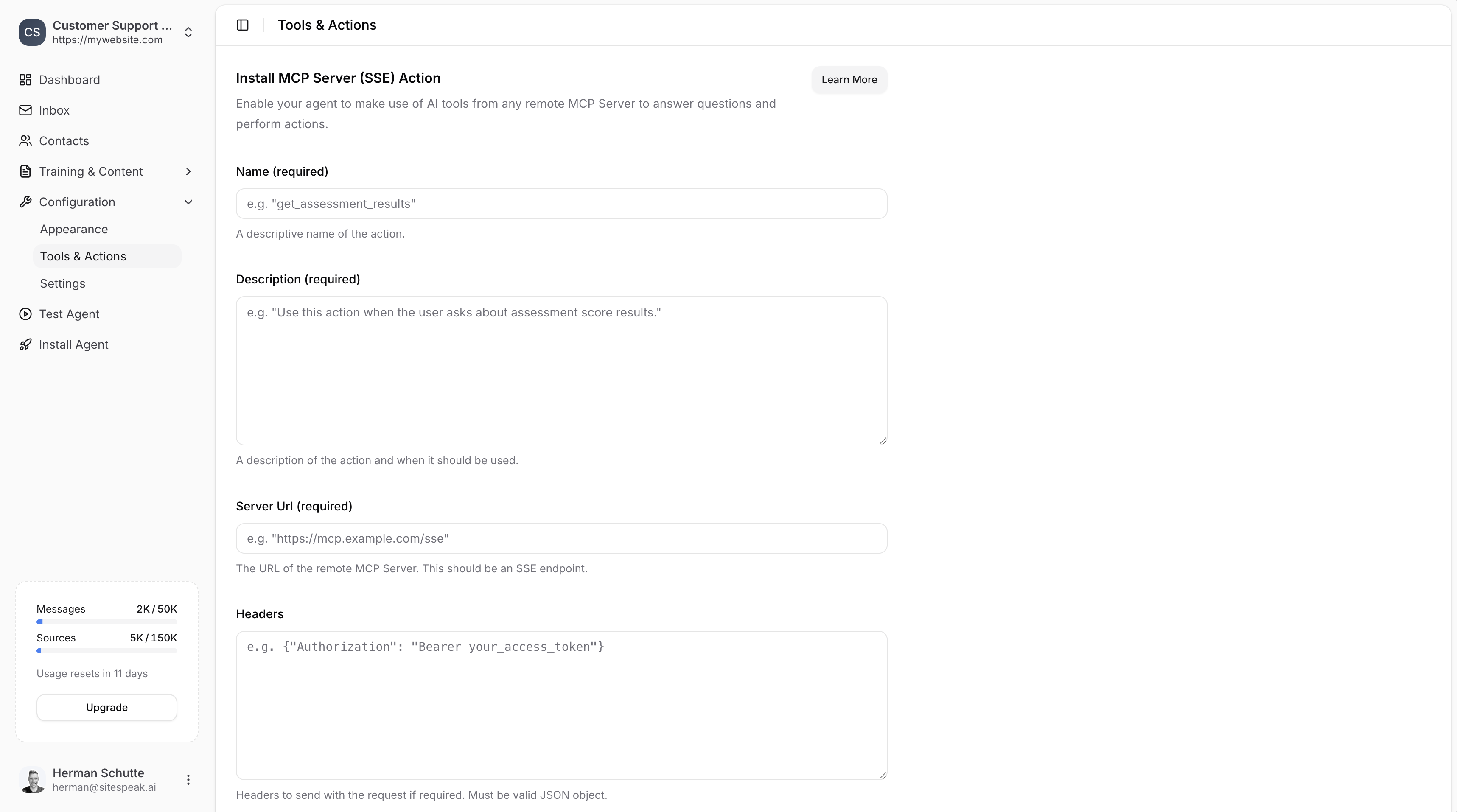 ### Name (required)
A descriptive name for the action.
**Example:** `get_weather_info`
### Description (required)
A description of the action and when it should be used.
**Example:** `Use this action when the user asks about weather information.`
Make sure the **Name** and **Description** are descriptive so that the agent knows exactly when to use this action.
### Server URL (required)
The URL of the remote MCP Server. This should be an SSE (Server-Sent Events) endpoint.
**Example:** `https://mcp.example.com/sse`
### Headers
Optional headers to send with the request. Must be a valid JSON object.
**Example:**
```json theme={null}
{"Authorization": "Bearer your_access_token"}
```
***
## Save the Action
Click **Add Action** to enable the MCP Server action for your AI agent.
Your agent will now be able to use AI tools from the connected MCP server to answer questions and perform actions.
***
## Example Use Case
You can create MCP servers using services like [mcpify.ai](https://mcpify.ai/) and have your agent use them to provide additional capabilities.
**Weather example:**
1. Create a weather MCP server using mcpify.ai
2. Add it to your agent using the MCP Server action
3. Your agent can now provide weather information as part of its responses
***
Join over 1000+ businesses, websites and startups automating their customer service and other tasks with a custom trained AI agent.
### Name (required)
A descriptive name for the action.
**Example:** `get_weather_info`
### Description (required)
A description of the action and when it should be used.
**Example:** `Use this action when the user asks about weather information.`
Make sure the **Name** and **Description** are descriptive so that the agent knows exactly when to use this action.
### Server URL (required)
The URL of the remote MCP Server. This should be an SSE (Server-Sent Events) endpoint.
**Example:** `https://mcp.example.com/sse`
### Headers
Optional headers to send with the request. Must be a valid JSON object.
**Example:**
```json theme={null}
{"Authorization": "Bearer your_access_token"}
```
***
## Save the Action
Click **Add Action** to enable the MCP Server action for your AI agent.
Your agent will now be able to use AI tools from the connected MCP server to answer questions and perform actions.
***
## Example Use Case
You can create MCP servers using services like [mcpify.ai](https://mcpify.ai/) and have your agent use them to provide additional capabilities.
**Weather example:**
1. Create a weather MCP server using mcpify.ai
2. Add it to your agent using the MCP Server action
3. Your agent can now provide weather information as part of its responses
***
Join over 1000+ businesses, websites and startups automating their customer service and other tasks with a custom trained AI agent.