> ## Documentation Index
> Fetch the complete documentation index at: https://sitespeak.ai/docs/llms.txt
> Use this file to discover all available pages before exploring further.
# Tools & Actions
> Add tools and actions to your AI agent to enable additional functionality like querying a database, making API calls, or integrating with third-party services.
Tools & Actions extend your chatbot's capabilities beyond answering questions from trained content. They allow your AI agent to retrieve real-time information, perform actions, and integrate with external services.
## Accessing Tools & Actions
Go to **Configuration → Tools & Actions** in your chatbot dashboard to view and add available tools.
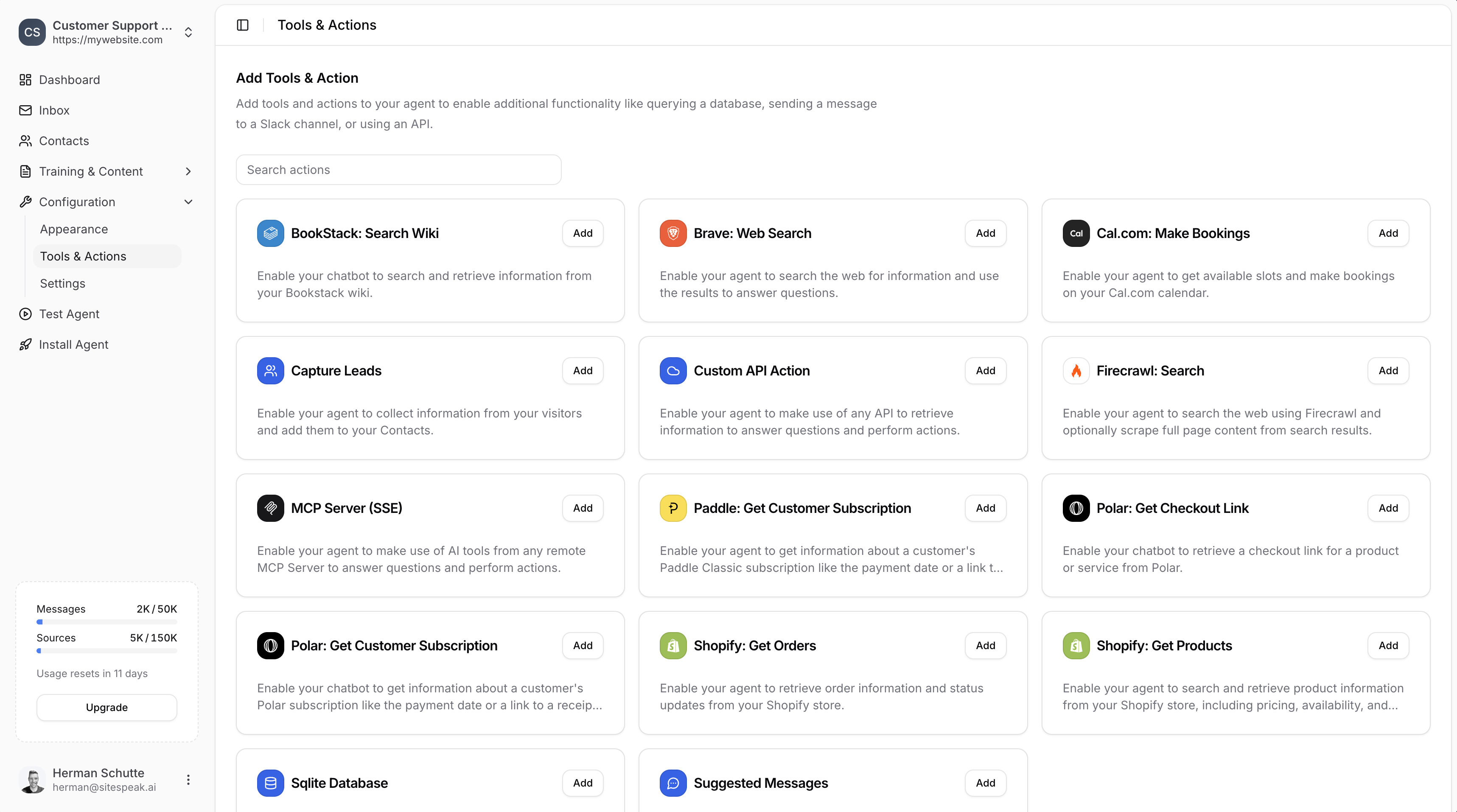 ***
## Available Tools & Actions
### Data & Search
Connect to any API to retrieve information or perform actions.
Query a SQLite database to answer visitor questions.
Search and retrieve information from your BookStack wiki.
Search the web for information to answer questions.
Search the web and optionally scrape full page content from results.
### Scheduling & Payments
Get available slots and make bookings on your Cal.com calendar.
Get available slots and make bookings on your Calendly calendar.
Retrieve Paddle Classic subscription information like payment dates or receipt links.
Retrieve a checkout link for a product or service from Polar.
Get information about a customer's Polar subscription.
### Ecommerce
Retrieve order information and status updates from your Shopify store.
Search and retrieve product information including pricing and availability.
### Agent Features
Collect information from visitors and add them to your Contacts.
Automatically suggest follow-up messages based on the conversation.
Connect to any remote MCP Server to use AI tools and perform actions.
***
## How to Add a Tool
1. Go to **Configuration → Tools & Actions**
2. Find the tool you want to add
3. Click the **Add** button
4. Configure the required settings
5. Click **Add Action** to enable it
Once added, your AI agent will automatically use the tool when appropriate based on visitor questions.
***
## Detailed Guides
Connect your agent to any API endpoint.
Enable your agent to chat with your database.
Search your BookStack wiki in real-time.
Search the web using Brave Search.
Web search with optional full page scraping.
Collect visitor information with forms.
Subscription info and checkout links from Polar.
Paddle Classic subscription information.
Auto-generate follow-up message suggestions.
Orders and products from your Shopify store.
Calendar availability and booking.
Calendar availability and booking via Calendly.
Connect to remote MCP servers.
***
Join over 1000+ businesses, websites and startups automating their customer service and other tasks with a custom trained AI agent.
***
## Available Tools & Actions
### Data & Search
Connect to any API to retrieve information or perform actions.
Query a SQLite database to answer visitor questions.
Search and retrieve information from your BookStack wiki.
Search the web for information to answer questions.
Search the web and optionally scrape full page content from results.
### Scheduling & Payments
Get available slots and make bookings on your Cal.com calendar.
Get available slots and make bookings on your Calendly calendar.
Retrieve Paddle Classic subscription information like payment dates or receipt links.
Retrieve a checkout link for a product or service from Polar.
Get information about a customer's Polar subscription.
### Ecommerce
Retrieve order information and status updates from your Shopify store.
Search and retrieve product information including pricing and availability.
### Agent Features
Collect information from visitors and add them to your Contacts.
Automatically suggest follow-up messages based on the conversation.
Connect to any remote MCP Server to use AI tools and perform actions.
***
## How to Add a Tool
1. Go to **Configuration → Tools & Actions**
2. Find the tool you want to add
3. Click the **Add** button
4. Configure the required settings
5. Click **Add Action** to enable it
Once added, your AI agent will automatically use the tool when appropriate based on visitor questions.
***
## Detailed Guides
Connect your agent to any API endpoint.
Enable your agent to chat with your database.
Search your BookStack wiki in real-time.
Search the web using Brave Search.
Web search with optional full page scraping.
Collect visitor information with forms.
Subscription info and checkout links from Polar.
Paddle Classic subscription information.
Auto-generate follow-up message suggestions.
Orders and products from your Shopify store.
Calendar availability and booking.
Calendar availability and booking via Calendly.
Connect to remote MCP servers.
***
Join over 1000+ businesses, websites and startups automating their customer service and other tasks with a custom trained AI agent.