> ## Documentation Index
> Fetch the complete documentation index at: https://sitespeak.ai/docs/llms.txt
> Use this file to discover all available pages before exploring further.
# Add Shopify Actions to Your AI Agent
> Enable your AI agent to retrieve order information and product details from your Shopify store.
The Shopify actions allow your AI agent to retrieve order and product information from your Shopify store, helping customers check order status, find products, and get shipping updates.
## Available Shopify Actions
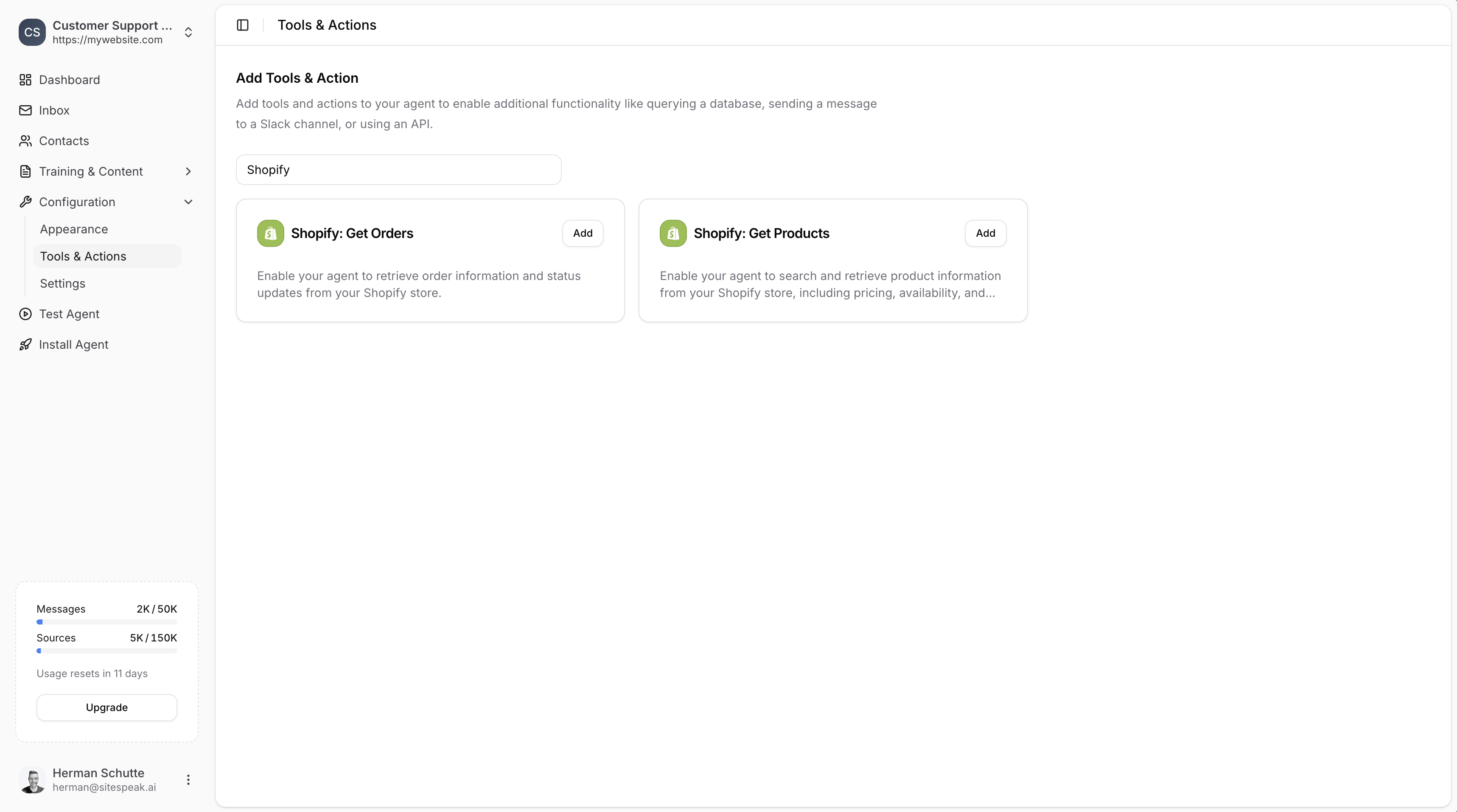
* **Shopify: Get Orders** - Retrieve order information and status updates from your Shopify store
* **Shopify: Get Products** - Search and retrieve product information including pricing, availability, and details
 ***
## Adding a Shopify Action
In your chatbot dashboard, go to **Configuration → Tools & Actions**.
Find **Shopify: Get Orders** or **Shopify: Get Products** and click **Add**.
***
## Configuration
Both Shopify actions require the same configuration:
***
## Adding a Shopify Action
In your chatbot dashboard, go to **Configuration → Tools & Actions**.
Find **Shopify: Get Orders** or **Shopify: Get Products** and click **Add**.
***
## Configuration
Both Shopify actions require the same configuration:
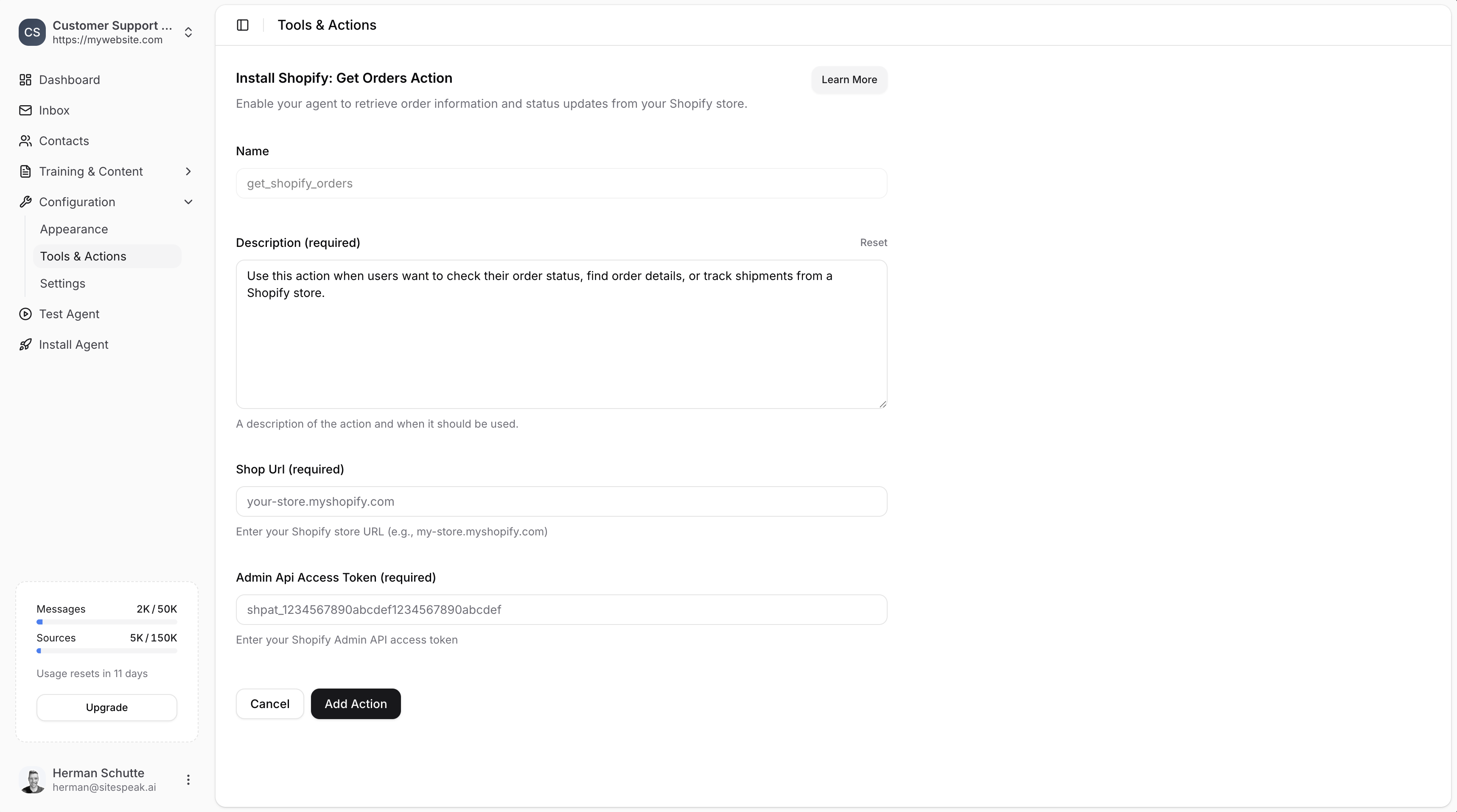 ### Name
A descriptive name for the action. Default: `get_shopify_orders` or `get_shopify_products`
### Description (required)
A description of the action and when it should be used.
**Example for orders:**
> Use this action when users want to check their order status, find order details, or track shipments from a Shopify store.
### Shop URL (required)
Your Shopify store URL in the format: `your-store.myshopify.com`
### Admin API Access Token (required)
Your Shopify Admin API access token. This requires creating a custom app in Shopify (see below).
***
## Creating a Shopify Custom App
To get your Admin API Access Token, you need to create a custom app in Shopify. This only takes a minute.
In your Shopify admin, click **Settings** in the sidebar.
Select **Apps and sales channels** from the sidebar.
Click the **Develop Apps** button to go to the App development section.
If this is your first custom app, click **Allow custom app development**.
Click **Create an app**. Enter an app name (e.g., "SiteSpeakAI Integration") and select yourself as the app developer.
Click **Configure Admin API scopes** to assign permissions.
Enable the following 3 permissions:
* `read_products`
* `read_orders`
* `read_customers`
Click the **API credentials** tab, then click **Install app** to install it in your store.
Click **Reveal token once** to get your Admin API access token.
You will not be able to see this token again. Copy it immediately and store it safely.
The token will be in the format: `shpat_abc123...`
***
## Save the Action
Add your Shop URL and Admin API Access Token to SiteSpeakAI, then click **Add Action** to enable it.
Your agent will now be able to:
* **Get Orders**: Retrieve order information, status updates, and shipping details
* **Get Products**: Search products and retrieve pricing, availability, and descriptions
***
## What Your Agent Can Do
### With Get Orders
* Check order status
* Find order details
* Track shipments
* Look up order history
### With Get Products
* Search for products by name
* Get product pricing
* Check availability
* Retrieve product descriptions
***
Join over 1000+ businesses, websites and startups automating their customer service and other tasks with a custom trained AI agent.
### Name
A descriptive name for the action. Default: `get_shopify_orders` or `get_shopify_products`
### Description (required)
A description of the action and when it should be used.
**Example for orders:**
> Use this action when users want to check their order status, find order details, or track shipments from a Shopify store.
### Shop URL (required)
Your Shopify store URL in the format: `your-store.myshopify.com`
### Admin API Access Token (required)
Your Shopify Admin API access token. This requires creating a custom app in Shopify (see below).
***
## Creating a Shopify Custom App
To get your Admin API Access Token, you need to create a custom app in Shopify. This only takes a minute.
In your Shopify admin, click **Settings** in the sidebar.
Select **Apps and sales channels** from the sidebar.
Click the **Develop Apps** button to go to the App development section.
If this is your first custom app, click **Allow custom app development**.
Click **Create an app**. Enter an app name (e.g., "SiteSpeakAI Integration") and select yourself as the app developer.
Click **Configure Admin API scopes** to assign permissions.
Enable the following 3 permissions:
* `read_products`
* `read_orders`
* `read_customers`
Click the **API credentials** tab, then click **Install app** to install it in your store.
Click **Reveal token once** to get your Admin API access token.
You will not be able to see this token again. Copy it immediately and store it safely.
The token will be in the format: `shpat_abc123...`
***
## Save the Action
Add your Shop URL and Admin API Access Token to SiteSpeakAI, then click **Add Action** to enable it.
Your agent will now be able to:
* **Get Orders**: Retrieve order information, status updates, and shipping details
* **Get Products**: Search products and retrieve pricing, availability, and descriptions
***
## What Your Agent Can Do
### With Get Orders
* Check order status
* Find order details
* Track shipments
* Look up order history
### With Get Products
* Search for products by name
* Get product pricing
* Check availability
* Retrieve product descriptions
***
Join over 1000+ businesses, websites and startups automating their customer service and other tasks with a custom trained AI agent.