> ## Documentation Index
> Fetch the complete documentation index at: https://sitespeak.ai/docs/llms.txt
> Use this file to discover all available pages before exploring further.
# Train Your Chatbot on PDFs and Files
> Upload PDFs, CSVs, text files, and audio files to train your chatbot on documents, manuals, and other content.
Upload documents to train your chatbot on product manuals, user guides, policies, FAQs, and any other content you have in file format. SiteSpeakAI extracts the content from your files and uses it to answer visitor questions.
## Uploading Files
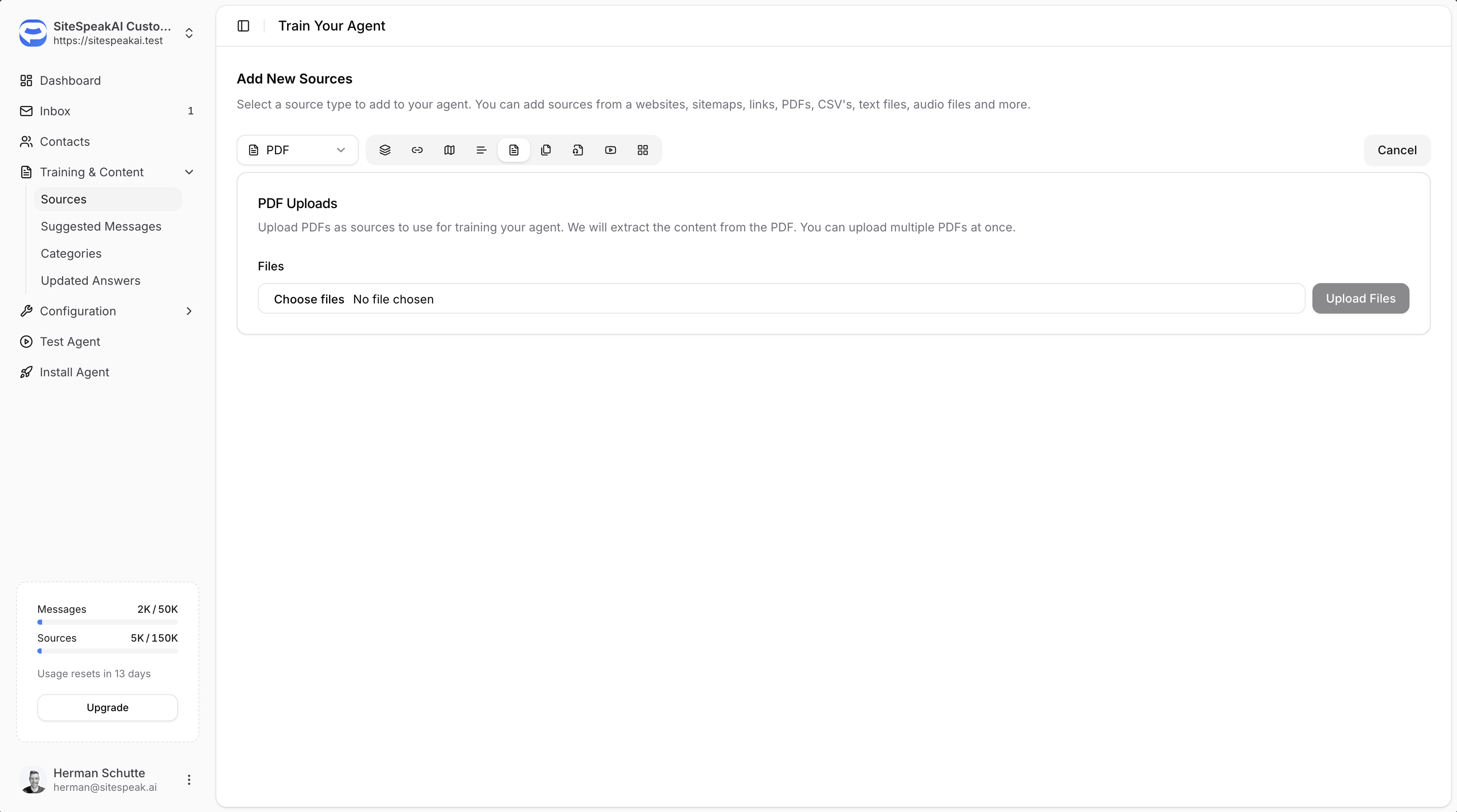
In your chatbot dashboard, click **Training & Content** in the sidebar.
Click on **Sources**.
Click the **+ Add Sources** button.
Select **PDF** from the source type dropdown.
Click **Choose files** and select the files you want to upload. You can upload multiple files at once.
Click the **Upload Files** button to upload and start training on your documents.
 ***
## Supported File Types
From the PDF source type, you can upload:
* **PDF files** (.pdf)
* **CSV files** (.csv)
* **Text files** (.txt)
***
## Best Practices
### Ensure Text is Extractable
* PDFs should contain actual text, not just scanned images
* Check that you can copy and paste text from your PDF before uploading
* Scanned documents may not extract properly if they haven't been OCR processed
### Use Descriptive File Names
* Name your files clearly so you can identify them in your Sources list
* This makes it easier to manage and update content later
### Keep Content Current
* Re-upload files when the content changes
* Delete outdated versions from your Sources to avoid confusion
***
Join over 1000+ businesses, websites and startups automating their customer service and other tasks with a custom trained AI agent.
***
## Supported File Types
From the PDF source type, you can upload:
* **PDF files** (.pdf)
* **CSV files** (.csv)
* **Text files** (.txt)
***
## Best Practices
### Ensure Text is Extractable
* PDFs should contain actual text, not just scanned images
* Check that you can copy and paste text from your PDF before uploading
* Scanned documents may not extract properly if they haven't been OCR processed
### Use Descriptive File Names
* Name your files clearly so you can identify them in your Sources list
* This makes it easier to manage and update content later
### Keep Content Current
* Re-upload files when the content changes
* Delete outdated versions from your Sources to avoid confusion
***
Join over 1000+ businesses, websites and startups automating their customer service and other tasks with a custom trained AI agent.