The web is going through a fundamental shift. AI agents like Claude, ChatGPT, Cursor, and Windsurf are becoming the primary way people find and interact with information. Instead of opening a browser and clicking through pages, users ask an AI assistant and expect an accurate, sourced answer.
This creates a problem for website owners: if your content isn't accessible to AI agents, you're invisible to a growing share of your audience.
Model Context Protocol (MCP) is the emerging standard that solves this. Backed by Anthropic, OpenAI, Google, and Microsoft, MCP gives AI agents a structured way to query your content directly. And with SiteSpeak, you get two ways to make this happen: a server-side MCP endpoint that developer tools connect to explicitly, and WebMCP support that announces your knowledge base to browser-based AI agents automatically. You can be up and running in seconds.
Here's what MCP is, why your website needs an endpoint, and how to set one up today.
What is MCP (Model Context Protocol)?
Think of MCP as "USB-C for AI." Before USB-C, every device had a different charging port. You needed a drawer full of cables. MCP does for AI integrations what USB-C did for hardware: one universal standard for connecting AI agents to external data sources.
Created by Anthropic in late 2024, MCP was donated to the Linux Foundation's Agentic AI Foundation in December 2025. The foundation's platinum members include Anthropic, OpenAI, Google, Microsoft, and AWS, making it clear that MCP isn't a single company's project but an industry standard.
The protocol works like this: AI agents act as MCP clients. They connect to MCP servers that expose tools and resources. When an agent needs information, it calls a tool on the server and gets structured results back. No scraping, no guessing, no stale data.
The adoption numbers tell the story. MCP SDK downloads surpassed 97 million per month by December 2025. There are over 10,000 active public MCP servers, and the official MCP registry launched in September 2025 to help agents discover them. Every major AI platform now supports MCP natively, including ChatGPT, Claude, Gemini, Cursor, Windsurf, and VS Code.
This isn't experimental technology. It's infrastructure.
ChatGPT plugins now connect to tools through MCP too. If you are moving a Custom GPT before it retires on 11 December 2026, our Custom GPT retirement guide shows how to rebuild its Custom Actions as an MCP server.
Why your website needs an MCP endpoint
AI agents are the new search crawlers
In the early 2000s, websites that weren't optimized for Google were effectively invisible. Today, the same dynamic is emerging with AI agents. Users don't always visit your website directly. They ask their AI assistant. If your content isn't available through MCP, the agent either can't answer or answers from outdated, scraped data.
Just as you optimized for search engines, you now need to optimize for AI agents.
Be where your audience is
Developers ask Cursor and Windsurf about your API. Customers ask Claude and ChatGPT about your product. Researchers ask AI agents for authoritative information in your field. When your content is accessible via MCP, your answers show up in all of these contexts, sourced and accurate.
Structured access beats scraping
When an AI agent scrapes your website, it gets raw HTML. It has to parse through navigation menus, footers, cookie banners, and ads to find the actual content. The results are often noisy, outdated, or incomplete.
An MCP endpoint provides clean, semantic access to your content through a RAG pipeline (Retrieval Augmented Generation) that includes vector search, query expansion, and reranking. The agent gets exactly the relevant content it needs, with source URLs for attribution.
Competitive advantage
MCP adoption is growing fast, but most websites don't expose an endpoint yet. Early movers who make their content AI-accessible will capture this emerging channel while competitors remain invisible to AI agents.
Developer ecosystem
Developers building AI tools and agents actively browse MCP registries for useful servers to integrate. Your MCP endpoint puts your content in front of builders who might incorporate your knowledge base into their workflows and products.
How SiteSpeak's MCP endpoint works
Every SiteSpeak chatbot can act as an MCP server. When you've trained a chatbot on your website content, documentation, or knowledge base, that same content becomes available to AI agents through a single endpoint.
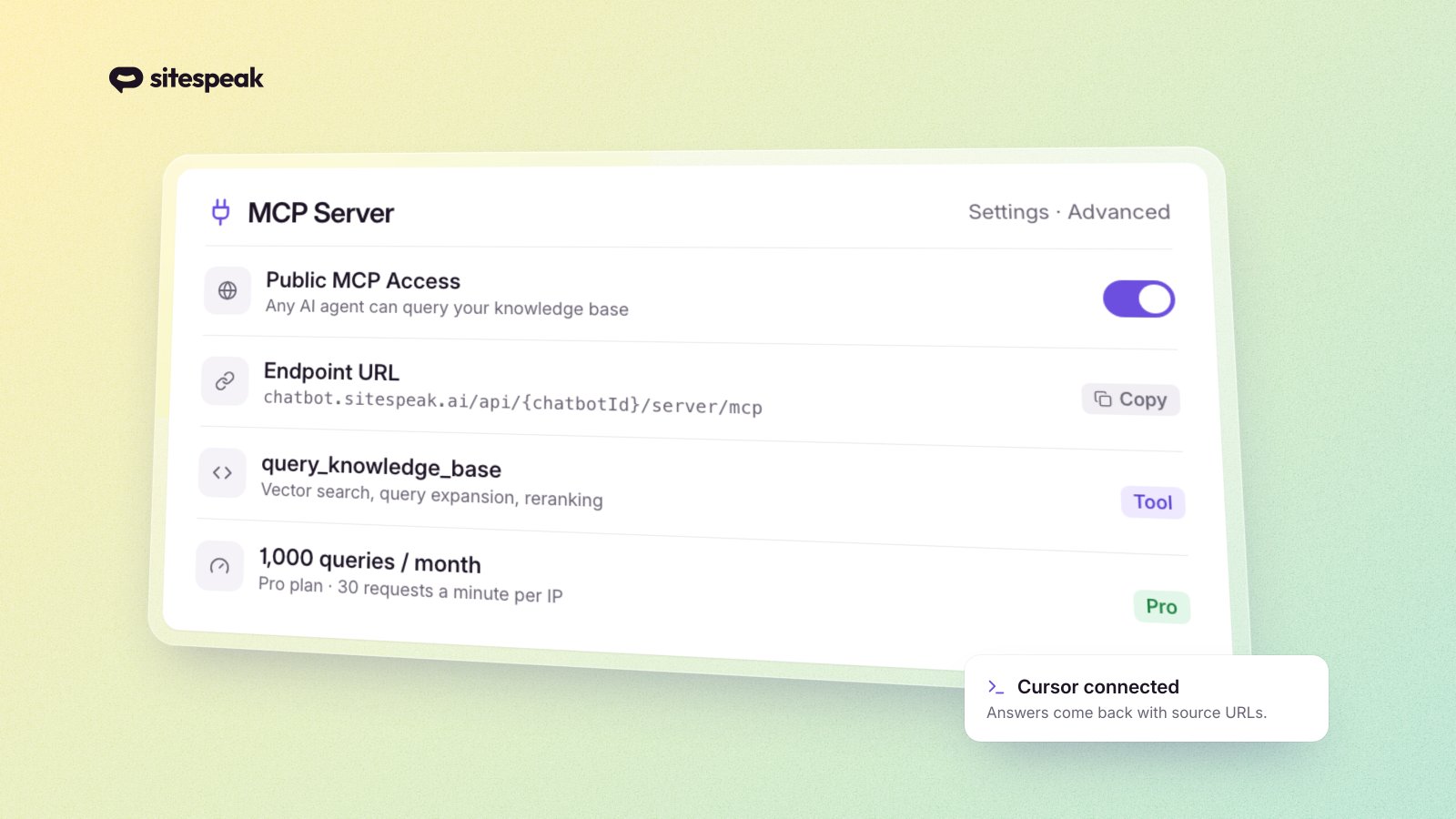
The server exposes one tool: query_knowledge_base. This tool accepts a natural language query and runs it through the full RAG pipeline, the same pipeline your chatbot uses to answer questions. That means vector search for semantic matching, query expansion for broader recall, and Cohere reranking for precision. The results include relevant content chunks with source URLs.
Two access modes
Public access requires no authentication. Any AI agent can query your knowledge base directly. This is ideal when you want maximum reach, such as exposing product documentation or support content.
Authenticated access requires a Bearer token. Agents must include your API token in the Authorization header. Use this for internal or sensitive knowledge bases.
Setup in 30 seconds
- Go to your chatbot's Settings > Advanced
- Find the MCP Server section
- Toggle Public MCP Access if you want open access
- Copy your endpoint URL
- Save
Your endpoint URL follows this format:
https://chatbot.sitespeak.ai/api/{chatbotId}/server/mcp
It works with Claude Desktop, Cursor, Windsurf, and any MCP-compatible client. Here's what the configuration looks like for Claude Desktop:
{
  "mcpServers": {
    "my-knowledge-base": {
      "type": "url",
      "url": "https://chatbot.sitespeak.ai/api/YOUR_CHATBOT_ID/server/mcp"
    }
  }
}
For authenticated endpoints, add a headers field with your API token:
{
  "mcpServers": {
    "my-knowledge-base": {
      "type": "url",
      "url": "https://chatbot.sitespeak.ai/api/YOUR_CHATBOT_ID/server/mcp",
      "headers": {
        "Authorization": "Bearer YOUR_API_TOKEN"
      }
    }
  }
}
Rate limits and plan quotas
MCP requests are rate-limited to 30 per minute per IP address. Monthly query credits depend on your plan:
- Pro: 1,000 queries/month
- Pro Plus: 2,500 queries/month
- Business: 10,000 queries/month
WebMCP: Automatic discovery for browser-based agents
Server-side MCP works well for developer tools and AI assistants that connect to a known endpoint URL. But it requires the user to configure the connection manually. WebMCP eliminates that step entirely.
WebMCP is a W3C standard that lets websites register tools directly with the visitor's browser. When someone visits your site using a WebMCP-capable browser like Chrome 146+, your website can announce: "I have a knowledge base you can query." The browser's built-in AI agent discovers the tool automatically. No endpoint URL to copy. No configuration file to edit. It just works.
How SiteSpeak enables WebMCP
If you're already using SiteSpeak's chat widget and have Public MCP Access enabled, WebMCP is automatic. The widget script detects browser support and registers a query_knowledge_base tool using the navigator.modelContext.registerTool() API. The tool description includes your site name so the agent knows what it can ask about.
When the browser's AI agent invokes the tool, it queries your knowledge base through the same RAG pipeline your chatbot and MCP endpoint use - vector search, query expansion, and reranking. The agent gets relevant content with source URLs, just like server-side MCP.
There's nothing extra to configure. If your chatbot has Public MCP Access toggled on, WebMCP registration happens on every page load where the widget is present.
Server-side MCP vs. WebMCP
Think of it this way:
- Server-side MCP is pull. Developers and AI tools seek out your endpoint, configure it, and query it on demand. It's how Cursor, Windsurf, and Claude Desktop connect.
- WebMCP is push. Your website announces itself to every compatible browser that visits. The visitor's AI agent discovers your knowledge base without any setup.
Together, they cover the full spectrum of AI agent access - from developer tools to everyday browser users.
Browser support
WebMCP shipped as an early preview in Chrome 146 (June 2025). Users can enable it via chrome://flags/#web-mcp. As the W3C standard matures and more browsers adopt it, WebMCP will become a default capability - similar to how service workers went from experimental flag to standard browser feature.
7 ways to promote your MCP endpoint
Setting up the endpoint is step one. Getting AI agents and developers to discover it is step two. Here are seven practical ways to increase your endpoint's reach.
1. Publish to the official MCP registry
The official MCP registry is where AI agents and developers look first for MCP servers. You can make your endpoint discoverable by publishing a server.json file at /.well-known/mcp/server.json on your domain:
{
  "name": "Your Company Knowledge Base",
  "description": "Query our product documentation, guides, and support articles.",
  "url": "https://chatbot.sitespeak.ai/api/YOUR_CHATBOT_ID/server/mcp",
  "transport": "streamable-http"
}
This follows the Well-known URI convention (RFC 8615) and enables auto-discovery by the registry and compatible clients.
2. Create an llms.txt file
The llms.txt standard is an emerging convention for helping AI agents discover resources on your website. Create a /llms.txt file and add it to your site's root directory that references your MCP endpoint alongside your documentation and API specs:
# Your Company

> Brief description of your company and what your content covers.

## MCP Server

- [Knowledge Base MCP Endpoint](https://chatbot.sitespeak.ai/api/YOUR_CHATBOT_ID/server/mcp): Query our documentation and support content via MCP.

## Documentation

- [API Reference](https://yoursite.com/docs/api)
- [Getting Started Guide](https://yoursite.com/docs/getting-started)
Over 844,000 websites have adopted llms.txt, including Anthropic, Cloudflare, and Stripe.
3. List on MCP directories
Beyond the official registry, submit your endpoint to community directories where developers actively search for MCP servers:
- mcp.so: One of the largest MCP server directories
- mcpt.com: Mintlify's MCP registry
- Smithery: MCP server registry with testing tools
- PulseMCP: Directory with 5,500+ listed servers
Each directory has its own submission process, but most only need your endpoint URL and a brief description.
4. Add to your documentation
Include MCP connection instructions in your developer docs or integration guides. Developers who already use your product are likely using MCP-compatible tools and would appreciate a direct integration path. Add a section like "Connect via MCP" with the endpoint URL and a configuration snippet.
5. Create a dedicated AI integration page
Add an "AI Integration" or "For Developers" page to your website that highlights your MCP endpoint. This page can serve double duty: it's useful for developers browsing your site and helps with SEO for searches like "your-product MCP server" or "your-product AI integration."
6. Share with your community
Announce your MCP endpoint on the channels your audience uses:
- Post on Twitter/X, LinkedIn, and relevant subreddits
- Share in Discord servers and Slack communities focused on AI development
- Create a GitHub repository or gist with example configurations
- Write a short tutorial showing how to connect your endpoint to popular tools
The AI developer community is actively looking for useful MCP servers to integrate. A single well-placed post can drive significant adoption.
7. Include in your robots.txt or site metadata
While there's no formal standard yet, you can reference your MCP endpoint in discoverable locations that signal AI-readiness. Add a comment or directive in your robots.txt:
# MCP Server
# https://chatbot.sitespeak.ai/api/YOUR_CHATBOT_ID/server/mcp
As standards for AI agent discovery evolve, having your endpoint referenced in machine-readable locations will help.
Real-world use cases
Customer support AI agents
Companies building internal AI assistants can connect to your MCP endpoint for accurate answers about your product. Instead of training their own models on your content (which goes stale), they get live access to your knowledge base. This is especially valuable for B2B products where partners need reliable product information.
Developer tools
IDE assistants like Cursor and Windsurf can query your documentation directly while developers write code. When a developer asks "how do I authenticate with the FooBar API?", the agent pulls the answer from your actual docs rather than relying on its training data, which may be months out of date.
Research agents
AI agents conducting research can query your content for authoritative information. If you're an industry expert, analyst, or content publisher, your MCP endpoint turns your website into a primary source that AI agents can cite directly.
Partner integrations
Business partners can build AI workflows that pull from your knowledge base. A partner's sales team could ask their AI assistant about your product specs, pricing, or integration capabilities, and get accurate, current answers sourced from your trained content.
Getting started
Setting up your MCP endpoint takes just a few minutes:
- Sign up for SiteSpeak (or log in to your existing account)
- Create and train a chatbot on your website content, documentation, or knowledge base
- Enable MCP in Settings > Advanced > MCP Server (this also activates WebMCP for your widget)
- Share your endpoint URL with AI tools, registries, and your audience
For complete setup instructions, configuration examples, and troubleshooting tips, see the full MCP endpoint documentation.
Is your website ready for AI agents?
Setting up an MCP endpoint is one piece of the puzzle. AI agents also look for signals like llms.txt files, structured data, semantic HTML, and fast server responses when deciding how to interact with your content.
We built a free AI Agent Readiness Scanner that checks your website across four categories:
- Content discoverability - Do you have an llms.txt file, sitemap, robots.txt that allows AI crawlers, and JSON-LD structured data?
- AI agent tools - Are WebMCP tools registered? Is an MCP endpoint discoverable?
- Content quality - Is your content well-structured with semantic headings, FAQ sections, and sufficient depth?
- Technical readiness - HTTPS, fast response times, server-rendered content?
You get an overall score, a breakdown by category, and specific recommendations for improvement.
Check your AI agent readiness score - it's free and takes about 30 seconds.
The bottom line
The web is evolving from human-browsable to AI-queryable. MCP is becoming the standard protocol that makes this transition possible, backed by every major AI company and governed by the Linux Foundation.
Being early matters. The websites that made their content crawlable in the early days of search engines captured an outsized share of organic traffic. The same dynamic is playing out now with AI agents.
SiteSpeak makes it simple to get started. Train a chatbot on your content, toggle on MCP, and your website becomes accessible to every MCP-compatible AI tool in the world.
Enable your MCP endpoint today and make sure your content is part of the conversation.