A new file is quietly becoming essential for websites: llms.txt. Just like robots.txt tells search engine crawlers how to navigate your site, llms.txt tells AI language models what your site is about and how to use its content.
If you want your website to show up accurately in AI-powered search results, chatbot responses, and AI assistants, you need an llms.txt file. Here is everything you need to know.
What is llms.txt?
llms.txt is a plain text file placed at the root of your website (e.g., yoursite.com/llms.txt) that provides structured information about your site specifically for large language models (LLMs) like ChatGPT, Claude, Gemini, and Perplexity.
Think of it as your website's resume for AI. It tells language models:
- What your company does
- What products or services you offer
- How your content is structured
- What information is most important
- How to accurately represent your brand
The Format
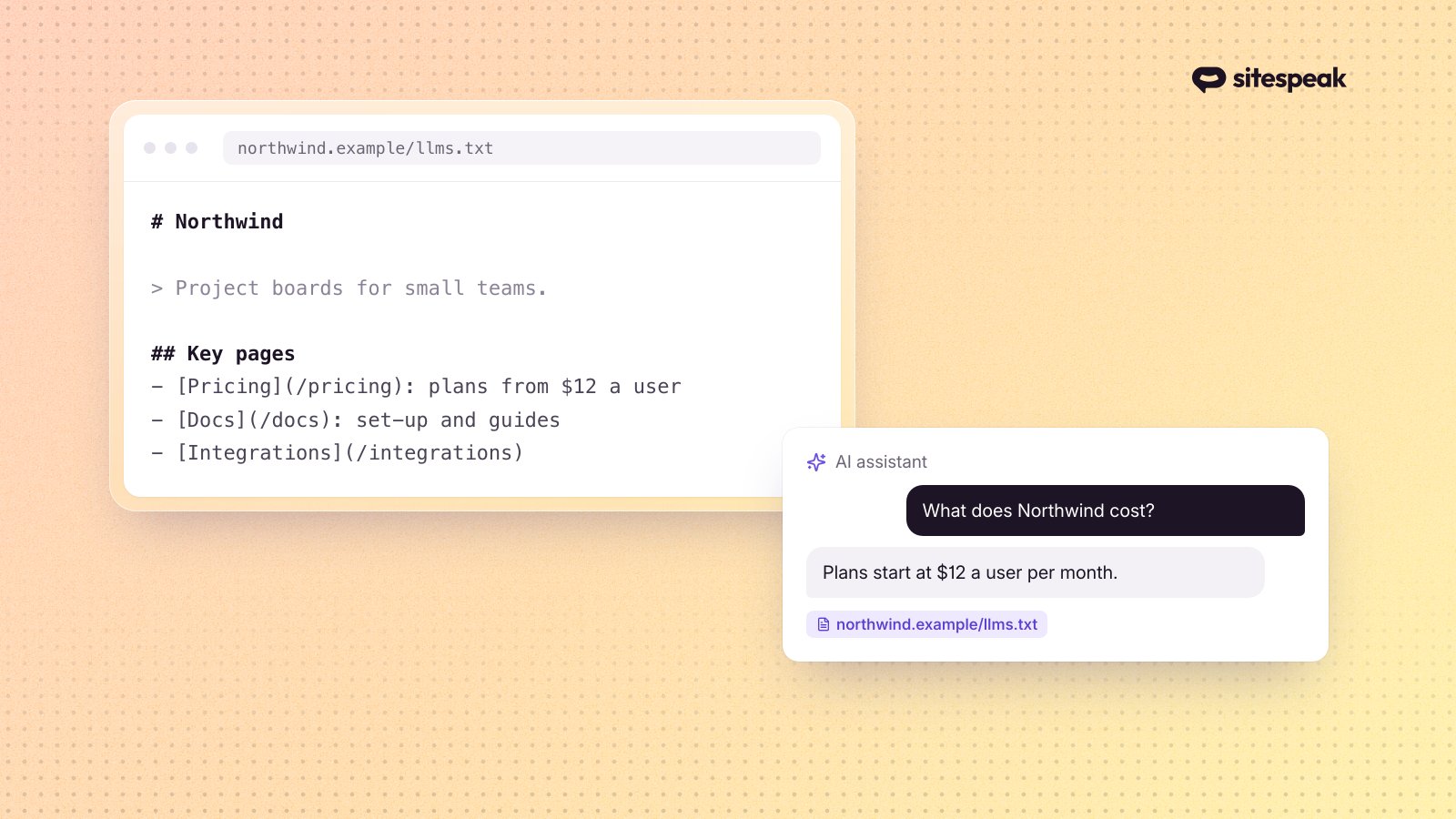
llms.txt uses a simple Markdown-based format. Here is a basic example:
```markdown
Your Company Name
A brief description of what your company does.
About
Your company provides [product/service] for [audience]. Founded in [year], you help customers [key value proposition].
Products
- [Product 1]: Description of what it does
- [Product 2]: Description of what it does
Key Pages
FAQ
- Q: What does your product do? A: [Clear, concise answer] ```
The format is intentionally simple. AI models can parse Markdown easily, and the structure helps them understand the relationships between different pieces of information.
Why Does llms.txt Matter?
AI Search is Growing Fast
AI-powered search is changing how people find information. Instead of clicking through 10 blue links, users ask ChatGPT, Perplexity, or Google's AI Overview a question and get a direct answer. If that answer mentions your product or service accurately, you win. If it does not, you are invisible.
AI search queries have grown over 300% year-over-year. Analysts predict that by 2027, traditional search traffic will drop 25% as users shift to AI assistants.
AI Models Need Context
When an AI model answers a question about your business, it draws on its training data - which may be months or years old, incomplete, or inaccurate. An llms.txt file gives AI models current, authoritative information directly from you.
Without llms.txt, an AI might:
- Describe your product using outdated information
- Get your pricing wrong
- Confuse you with a competitor
- Miss your key features entirely
With llms.txt, the AI has a reliable, up-to-date source of truth about your business.
It Complements robots.txt
robots.txt tells crawlers what they CAN access. llms.txt tells AI models what they SHOULD know. They serve different purposes:
| File | Audience | Purpose |
|---|---|---|
| robots.txt | Web crawlers | Access permissions |
| sitemap.xml | Search engines | Page discovery |
| llms.txt | AI models | Content understanding |
| humans.txt | Humans | Team credits |
llms.txt fills a gap that robots.txt and sitemaps were never designed to address: helping AI understand the meaning and importance of your content, not just its location.
Who Should Have an llms.txt File?
Every website benefits from an llms.txt file, but these businesses should prioritize it:
SaaS Companies
AI assistants frequently answer questions like "What is the best tool for X?" or "How does [product] compare to [competitor]?" An llms.txt file ensures your product is described accurately in these responses.
E-commerce Stores
Product information, shipping policies, return policies, and pricing are frequently queried by AI. Keeping this information current in your llms.txt helps AI assistants give accurate answers.
Service Businesses
Lawyers, consultants, agencies, and other service providers benefit from clearly stating their expertise, service areas, and contact information in a format AI can parse.
Content Publishers
Blogs, news sites, and educational platforms can use llms.txt to highlight their most authoritative content and help AI models cite them correctly.
How to Create an llms.txt File
Option 1: Use a Generator (Fastest)
The easiest way to create an llms.txt file is with an AI-powered generator. The free llms.txt generator from SiteSpeak analyzes your website and creates a structured llms.txt file automatically.
- Go to the llms.txt generator
- Enter your website URL
- The AI crawls your site and generates the file
- Review, edit if needed, and download
- Upload to your website root directory
This takes about 2 minutes and produces a well-structured file tailored to your site.
Option 2: Write It Manually
If you prefer to write your llms.txt by hand, follow this structure:
1. Start with your company name as an H1
Use a single hash followed by your company name.
2. Add a one-line description
Use a blockquote with a brief summary of what your company does.
3. Add sections for key information
Include sections like About, Products/Services, Key Pages, Documentation, and FAQ. Use Markdown formatting with headers, lists, and links.
4. Keep it concise
AI models work best with clear, concise information. Aim for 500-2,000 words. Do not dump your entire website into the file.
5. Update it regularly
Whenever you change pricing, launch new features, or update policies, update your llms.txt file too.
Option 3: Generate from Your CMS
If you use WordPress, you can create a custom page at /llms.txt with a plain text template. Some WordPress plugins are emerging that auto-generate llms.txt from your site content.
For custom-built sites, you can create a route that dynamically generates llms.txt from your database.
Best Practices for llms.txt
Do: Be Accurate
Everything in your llms.txt should be current and truthful. AI models will use this information to answer user questions, and inaccuracies erode trust.
Do: Prioritize Important Information
Put your most important information first. AI models weight earlier content more heavily. Lead with what matters most - your core product, primary use case, and key differentiators.
Do: Use Clear Language
Write for clarity, not marketing fluff. Instead of "We are the world-leading revolutionary AI-powered solution," write "We build AI chatbots that answer customer questions using your website content."
Do: Include Structured Data
Use Markdown formatting consistently. Headers, lists, links, and tables help AI models parse the information accurately.
Do: Link to Key Pages
Include URLs for your most important pages. This helps AI models direct users to the right place and verify information.
Don't: Stuff Keywords
AI models are sophisticated enough to detect keyword stuffing. Write naturally.
Don't: Include Confidential Information
llms.txt is a public file. Do not include internal pricing, unreleased features, or sensitive business data.
Don't: Make It Too Long
A focused 1,000-word file is more useful than a 10,000-word dump. Be selective about what you include.
Don't: Set It and Forget It
Review and update your llms.txt at least quarterly, or whenever you make significant changes to your product or business.
How llms.txt Fits Into Your AI SEO Strategy
llms.txt is one piece of a broader strategy for AI visibility:
- llms.txt - Structured information for AI models
- Schema markup - Structured data for search engines and AI
- Quality content - Blog posts, docs, and help articles that AI can reference
- Authority signals - Backlinks, citations, and brand mentions that AI models weigh
Together, these elements help AI models understand, trust, and accurately represent your business.
The Connection to AI Chatbots
If you use an AI chatbot on your website (like SiteSpeak AI), your llms.txt file serves double duty. The same structured content that helps external AI models understand your business also helps your own chatbot give better answers.
In fact, creating an llms.txt file is a good exercise in clarifying your messaging - if you cannot explain your business clearly in a structured text file, your chatbot and your customers will struggle too.
The Future of llms.txt
The llms.txt standard is still early, but adoption is accelerating. Major AI companies are beginning to check for llms.txt files when indexing websites, and the format is likely to evolve with more standardized fields and validation.
Early adopters have an advantage. By creating your llms.txt file now, you:
- Establish accurate AI representations of your brand before competitors
- Build a habit of keeping AI-facing content current
- Position your website for whatever AI search standards emerge next
Get Started
Creating an llms.txt file takes minutes and costs nothing. Use the free llms.txt generator to create yours automatically, or write one by hand using the format above.
Then upload it to your website root, and you are done. Your website is now AI-readable.
As AI continues to reshape how people find and interact with businesses online, the websites that communicate clearly with AI models will have a significant advantage. llms.txt is the simplest step you can take today to start building that advantage.