Managing client chatbots from your agency dashboard just got a lot easier. You can now view, create, and manage chatbots for any client without leaving the agency page.
Expandable Client Rows
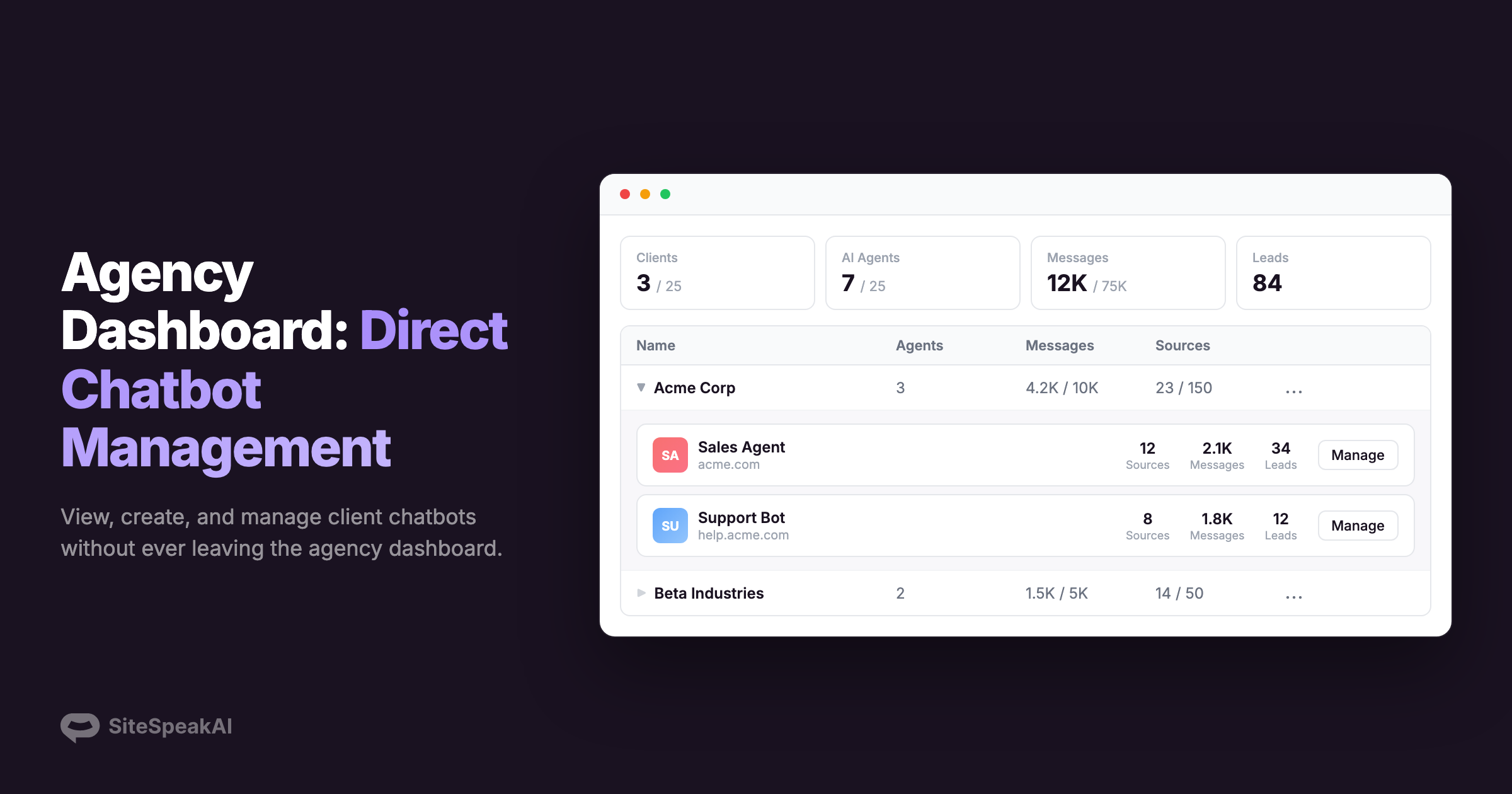
Each client in your agency dashboard can now be expanded to see all their chatbots at a glance. Click a client name to reveal their agents with key stats - sources, messages, and leads - so you can quickly assess how each chatbot is performing.
Create Agents Directly
No more switching to a client workspace just to create a chatbot. Click Create Agent from the client's action menu, enter a name, website URL, and theme color, and the agent is created and starts training immediately. You are then taken straight to the sources page to add more training data.
Client Context Banner
When managing a client's chatbot, a banner at the top of the page shows which client you are working on. A Back to Agency link in the sidebar makes it easy to return to the agency dashboard.
Clearer Navigation
The profile menu now separates your own teams from agency client teams into distinct sections. When managing a client, the team switcher no longer mixes client teams with your own, reducing confusion when working across multiple accounts.
Additional Improvements
- Fixed an issue where the powered-by URL in agency branding settings would not save when entered without https://