Reply to visitors by email without staring at a blank message. The new Draft email action turns any visitor question into a ready-to-send email draft, grounded in your chatbot's training data, with two clicks.
How it works
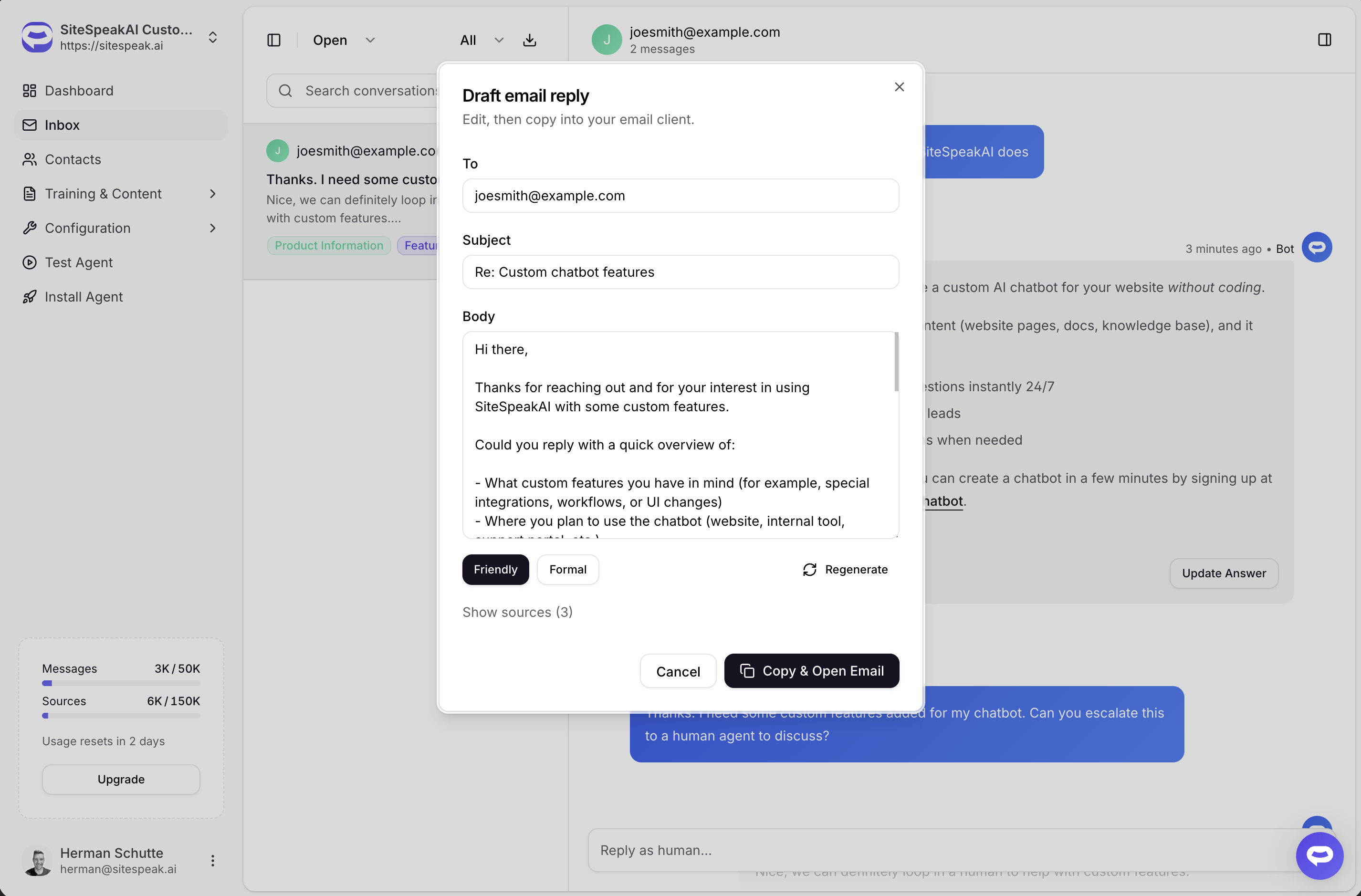
Open a conversation in the inbox, hover any visitor message, and click Draft email. We pull together the visitor's question, the rest of the conversation, and the most relevant content from your knowledge base, then write a full reply for you. You can edit anything before sending.
When you click Copy & Open Email, the body lands on your clipboard with formatting preserved, and your default mail client opens with the visitor's address and a subject line already filled in. Paste, send, done.
Friendly or formal, your call
Switch between Friendly and Formal tones with one click. Already generated a draft in one tone? Switching back is instant - we cache each tone so you can compare without burning through credits.
Sources you can check
Every draft comes with a list of the URLs we used from your training data. One click to expand, one click to verify the bot got its facts right before you send.
Availability
AI-drafted email replies are available on the Growth plan and above, including all Agency plans. The visitor needs to have left their email at some point in the conversation - if there is no email on file, the action stays out of your way.