You can now track every change made to your chatbots with a detailed audit log. See who changed what, when, and view the exact before and after values for every setting change.
How it works
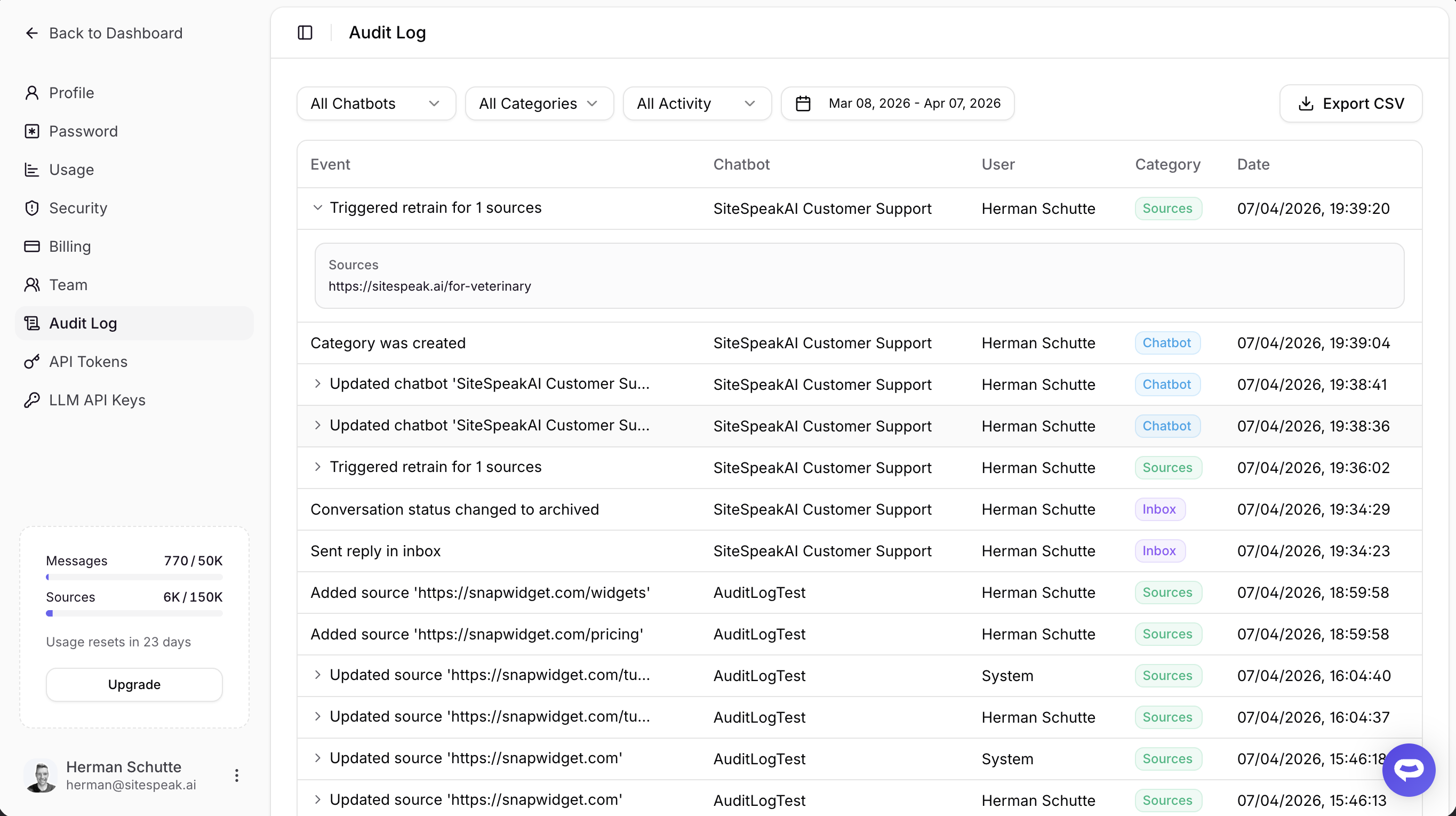
Navigate to Profile > Audit Log to see a chronological feed of all activity across your team's chatbots. Each entry shows the event, which chatbot it happened on, who made the change, and when.
For setting changes like updating your AI model or welcome message, click the event to expand and see exactly what changed - the old value and the new value side by side.
What's tracked
- Chatbot settings - Name, colors, prompts, AI model, and all configuration changes with before/after diffs
- Sources - Added, removed, retrained and automaticly synced
- Inbox - Conversation status changes, human replies, and live chat sessions
- Integrations - Actions and integrations connected or disconnected
- Team - Members invited or removed
- Suggested messages, categories, and answers - Created, updated, or deleted
Filtering and export
Use the filters at the top to narrow down by chatbot, category, team member, or date range. Need the data offline? Export the filtered results as a CSV file.
All audit log entries are retained for 90 days.
Availability
Audit Log is available on Business and Agency plans.