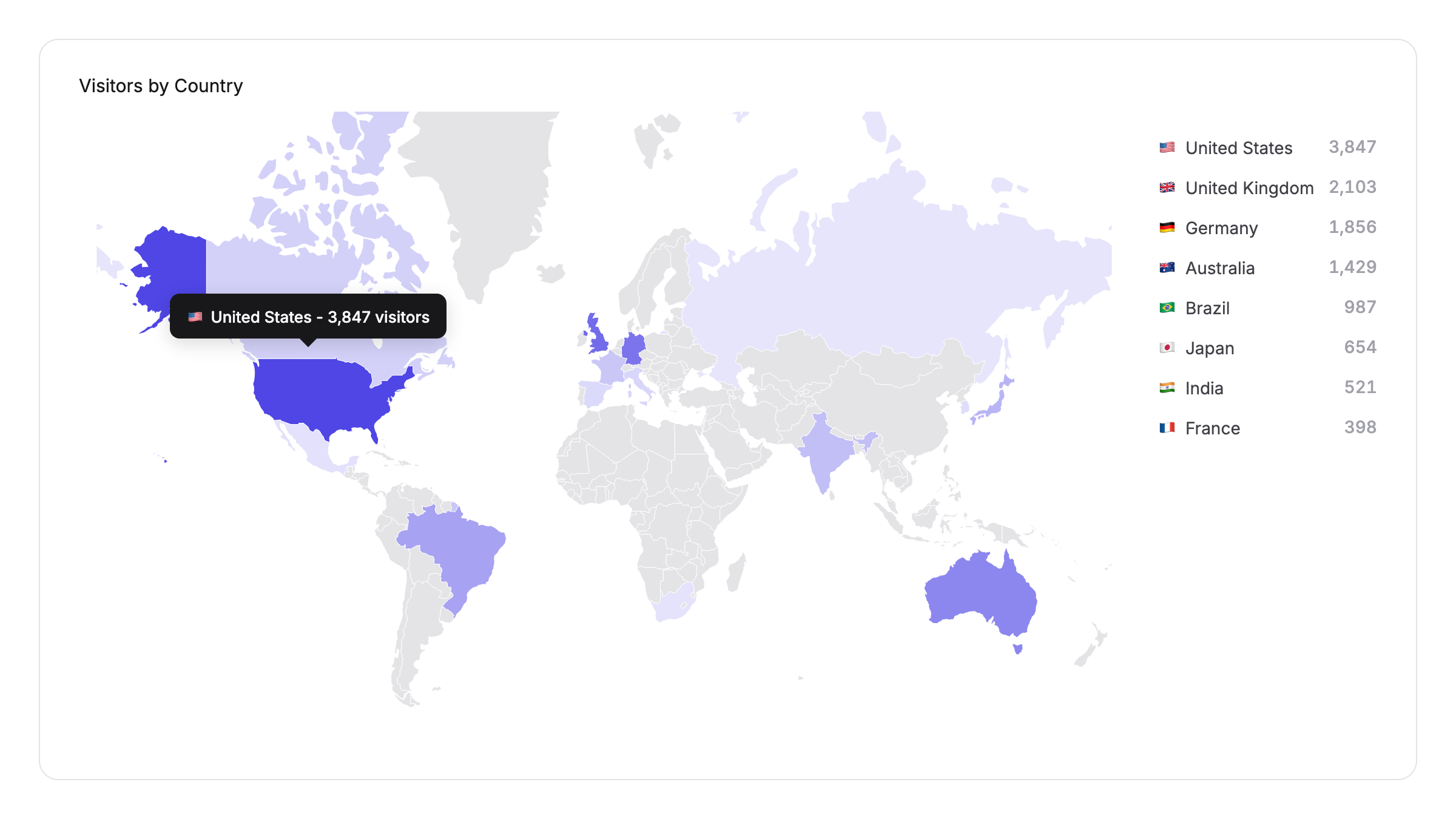
You can now see which countries your chatbot visitors are coming from with the new Visitor Geolocation feature. When enabled, your dashboard displays an interactive world map highlighting visitor locations, and country data appears throughout your inbox and contacts pages.
Privacy-First Design
Visitor Geolocation is built with privacy in mind. The feature is disabled by default and must be explicitly enabled per chatbot. Only the country name is stored - IP addresses are never saved or logged. Country data is identified at the network level and the IP is immediately discarded.
Interactive World Map
Your dashboard now includes a world map that highlights countries where your visitors are located. Countries with more visitors appear in a darker shade, giving you an at-a-glance view of your global reach. A legend beside the map shows your top countries by visitor count.
Country Data Everywhere
Once enabled, visitor country data appears across your workspace:
- Inbox - The contact details sidebar shows each visitor's country with a flag emoji
- Contacts - A country column in the leads table displays the flag and country code, with the full name on hover
- Contact Details - The visitor details dialog includes the country alongside other contact information
- CSV Export - Country data is included when you export your leads
How to Enable
Navigate to Configuration > Settings > Basic and toggle on Visitor Geolocation. Country data will start appearing for new conversations immediately.