

In the SiteSpeak dashboard, this section is labeled Inbox.
Viewing conversations
The left sidebar lists all visitors sorted by most recent activity. Click on a visitor to see their full conversation history. Use the controls at the top to narrow down conversations:- Open / Closed: Filter by conversation status
- Category: Filter by conversation category
- Search: Search for specific conversations by keyword
Contact details
The right panel displays visitor information including their name, email address, when they were last seen, and their total message count.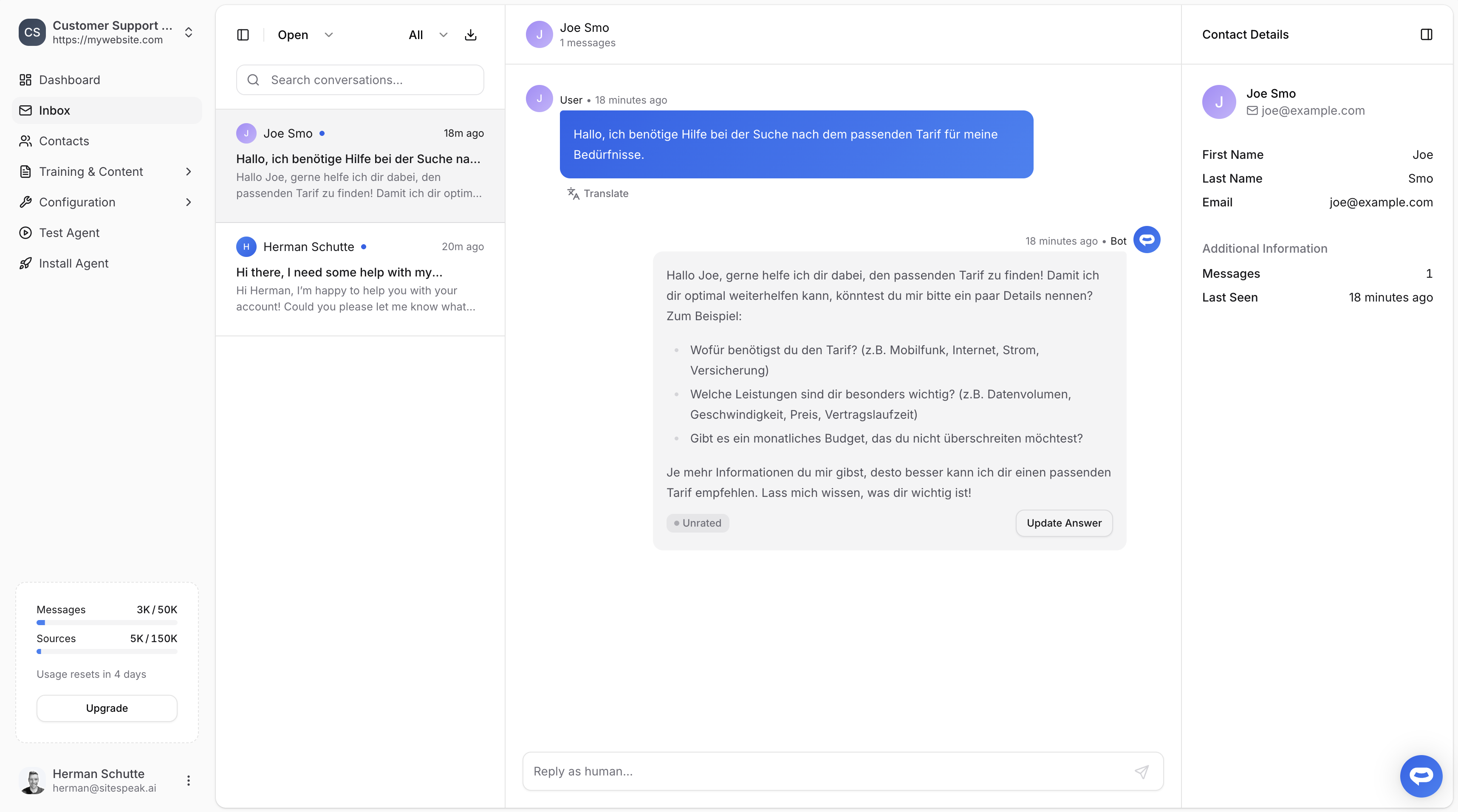
Translating messages
Message translation is available on the Business plan.
Replying via Live Chat
You can respond to visitors directly from the Conversation History page by typing a message in the input field. This starts a Live Chat session where the AI is paused until you end it. For full details on escalations and live chat, see Human handoff.Exporting conversations
Click the download icon to export a conversation as a CSV file.Ready to automate your customer service with AI?
Join over 1000+ businesses, websites and startups automating their customer service and other tasks with a custom trained AI agent.