

Uploading Files
1
Go to Training & Content
In your chatbot dashboard, click Training & Content in the sidebar.
2
Select Sources
Click on Sources.
3
Click Add Sources
Click the + Add Sources button.
4
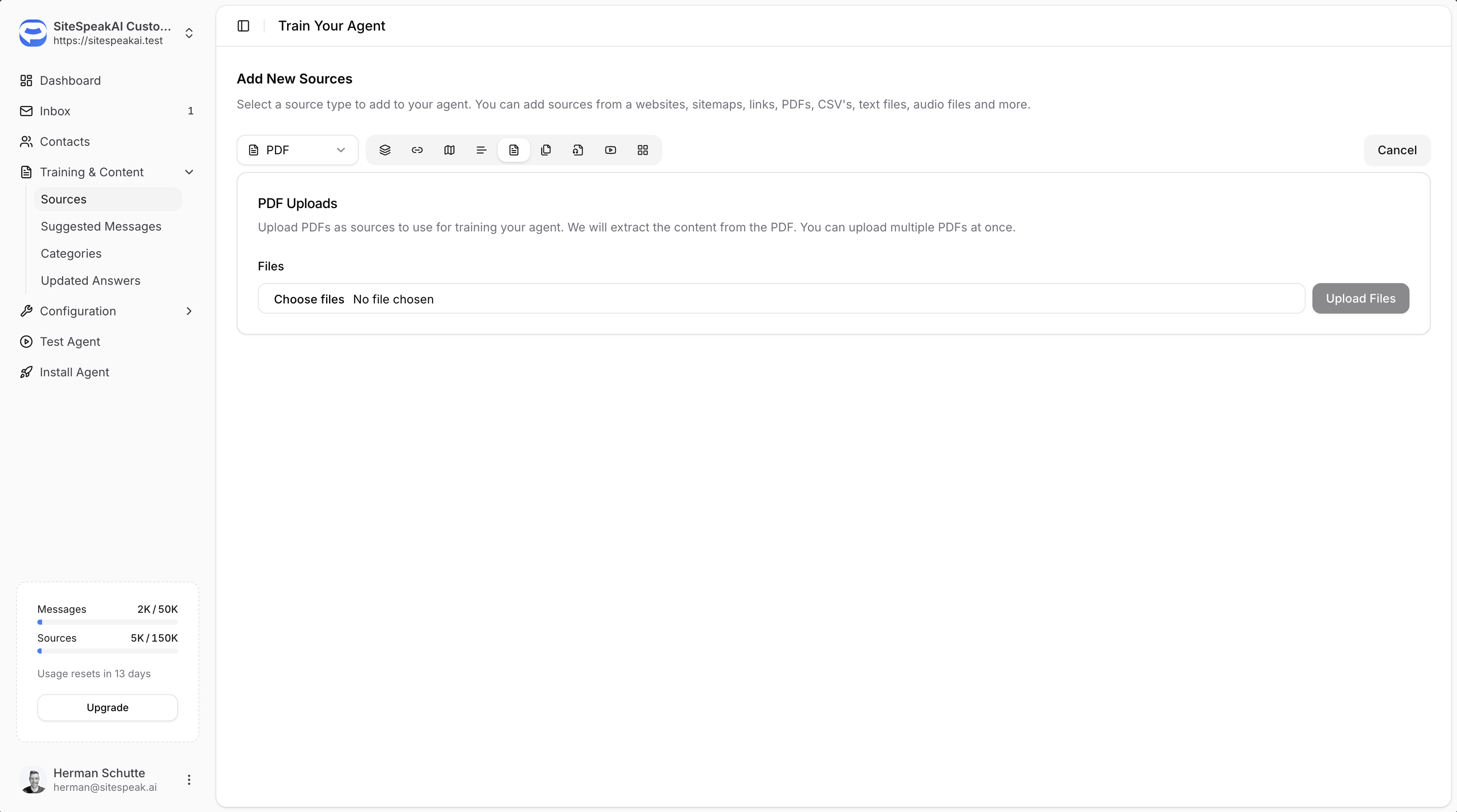
Select PDF from the dropdown
Select PDF from the source type dropdown.
5
Choose your files
Click Choose files and select the files you want to upload. You can upload multiple files at once.
6
Upload Files
Click the Upload Files button to upload and start training on your documents.
Supported File Types
From the PDF source type, you can upload:- PDF files (.pdf)
- CSV files (.csv)
- Text files (.txt)
Best Practices
Ensure Text is Extractable
- PDFs should contain actual text, not just scanned images
- Check that you can copy and paste text from your PDF before uploading
- Scanned documents may not extract properly if they haven’t been OCR processed
Use Descriptive File Names
- Name your files clearly so you can identify them in your Sources list
- This makes it easier to manage and update content later
Keep Content Current
- Re-upload files when the content changes
- Delete outdated versions from your Sources to avoid confusion
Ready to automate your customer service with AI?
Join over 1000+ businesses, websites and startups automating their customer service and other tasks with a custom trained AI agent.