

Why Use BookStack with SiteSpeakAI?
BookStack is a popular open-source wiki platform used by thousands of organizations for documentation and knowledge management. By connecting it to SiteSpeakAI, you can:- Instant answers: Let visitors ask questions in natural language instead of searching
- 24/7 availability: Provide support even when your team is offline
- Reduced support load: Automate responses to common questions
- Always up-to-date: SiteSpeakAI automatically checks for new and updated content every hour
Prerequisites
Before connecting BookStack to SiteSpeakAI, you’ll need:- A BookStack installation with API access enabled
- A BookStack API token and secret
- A SiteSpeakAI account (sign up free)
How to Get Your BookStack API Credentials
1
Log in to BookStack
Access your BookStack installation as an administrator.
2
Go to your profile
Click on your profile icon and select Edit Profile.
3
Create an API token
Scroll down to the API Tokens section and click Create Token.
4
Copy your credentials
Copy both the Token ID and Token Secret. Store these securely as the secret won’t be shown again.
Make sure your API token has read access to the content you want your chatbot to use. Check your BookStack role permissions if needed.
Connect BookStack to SiteSpeakAI
1
Open your chatbot dashboard
Log in to SiteSpeakAI and select your chatbot.
2
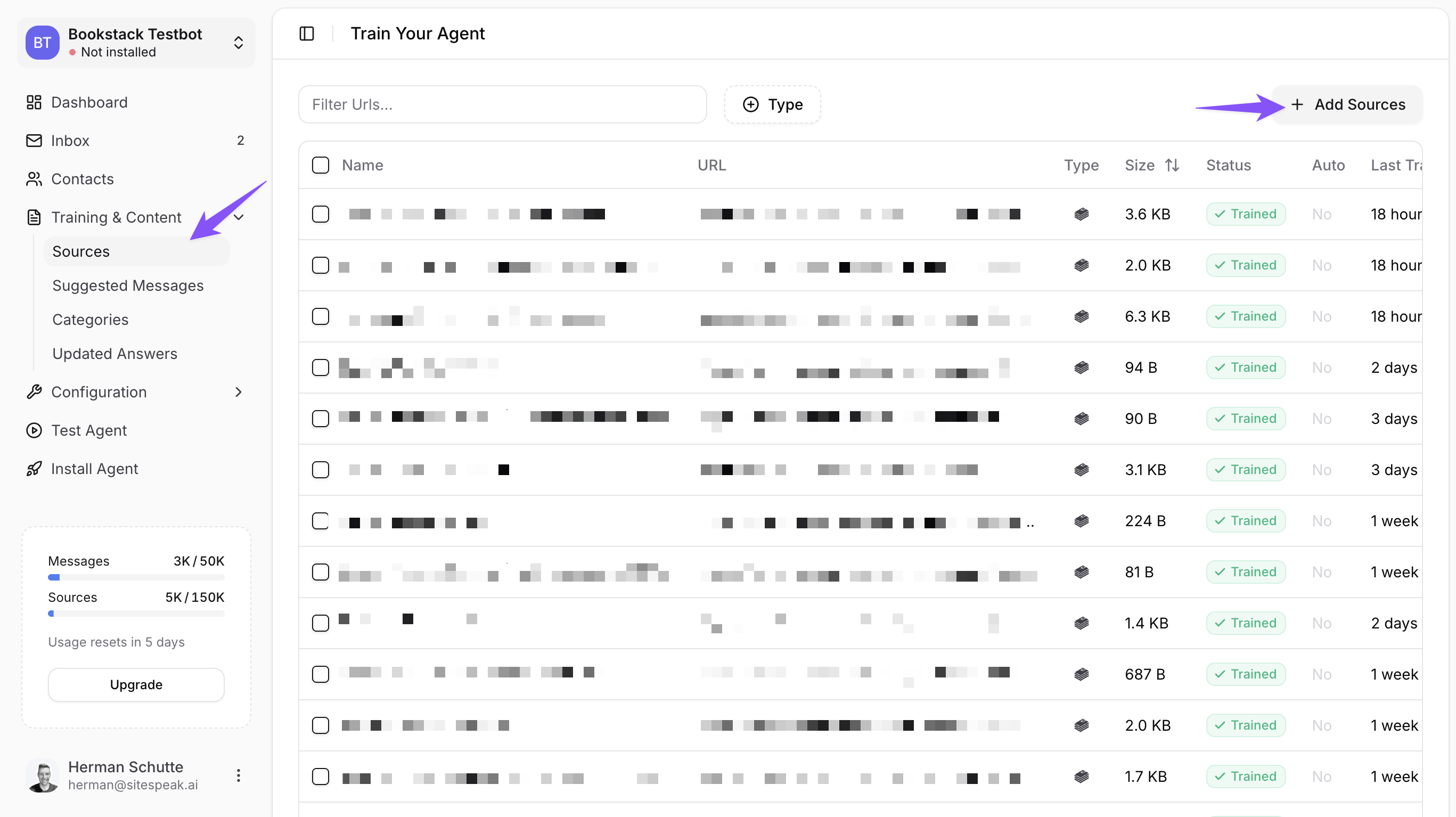
Go to Training & Content
Click Training & Content in the sidebar, then select Sources.
3
Click Add Sources
Click the + Add Sources button in the top right corner.
4
Select Apps
In the source type dropdown, select Apps to see available integrations.
5
Choose BookStack
Click on the BookStack integration option.
Enter Your BookStack Details
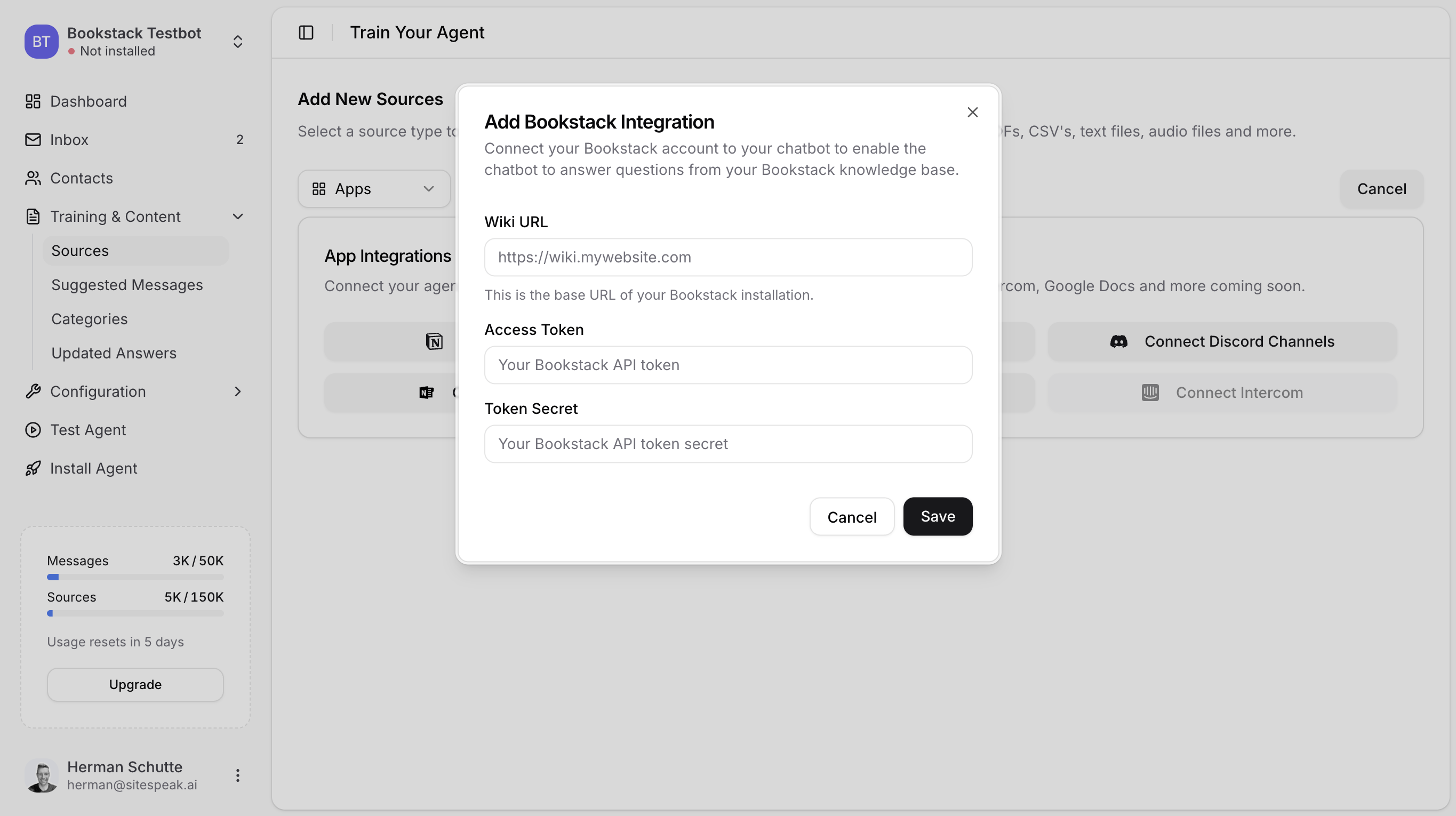
In the Add Bookstack Integration modal:1
Enter your Wiki URL
Enter the base URL of your BookStack installation (e.g.,
https://wiki.mywebsite.com).2
Add your Access Token
Paste the API Token ID you copied from BookStack.
3
Add your Token Secret
Paste the API Token Secret.
4
Save the integration
Click Save to connect your BookStack wiki.
What Gets Imported
Once connected, SiteSpeakAI imports every BookStack page your API token’s user can view. Each page appears as its own source:- Automatic import: All pages visible to the token’s user are fetched and processed
- Monitor status: Watch the training progress in the Sources list
- Control what’s included: Use BookStack’s role and content permissions to limit which pages the token’s user (and so your chatbot) can see
How Your Chatbot Uses BookStack Content
After training, your chatbot will:- Search your BookStack content when visitors ask questions
- Provide answers based on relevant wiki pages
- Cite sources so visitors know where the information comes from
- Handle follow-up questions with context awareness
Example Interaction
Visitor: “How do I reset my password?” Chatbot: “To reset your password, go to the login page and click ‘Forgot Password’. Enter your email address and you’ll receive a reset link within a few minutes. If you don’t see the email, check your spam folder.” Source: Password Reset Guide (BookStack)Keeping Content Updated
Once connected, SiteSpeakAI automatically keeps your chatbot in sync with your BookStack wiki:- Automatic sync: SiteSpeakAI checks BookStack for new and updated pages every hour
- No manual action required: Your chatbot automatically trains on any content changes
Troubleshooting
Connection Failed
If you can’t connect to BookStack:- Verify your Wiki URL is correct and accessible
- Check that API access is enabled in BookStack settings
- Ensure your token hasn’t expired or been revoked
- Confirm your token has read permissions
Content Not Appearing
If your content isn’t being fetched:- Make sure the role of the user who created the API token has both the Access system API and Export content permissions enabled (BookStack Settings → Roles). Without them, BookStack rejects the API or page-export requests and no content is imported
- Check your BookStack role permissions
- Verify the pages aren’t restricted to specific roles
- Try creating a new API token whose role has the Access system API and Export content permissions, plus view access to the books you want imported
Chatbot Giving Wrong Answers
If responses aren’t accurate:- Review and update your BookStack content
- Add more detailed information to relevant pages
- Use fine-tuning to improve specific responses
Frequently Asked Questions
Can I use multiple BookStack instances?
Can I use multiple BookStack instances?
Yes, you can connect multiple BookStack installations to a single chatbot by adding each as a separate source.
How often does SiteSpeakAI sync with BookStack?
How often does SiteSpeakAI sync with BookStack?
SiteSpeakAI automatically checks your BookStack wiki for new and updated content every hour. No manual action is required.
What do I need from BookStack to connect?
What do I need from BookStack to connect?
You need your BookStack Wiki URL, an API Access Token, and the Token Secret. You can create these in your BookStack profile under API Tokens.
Next Steps
Fine-tune responses
Improve your chatbot’s answers with custom training.
Install on your site
Add your trained chatbot to your website.
Add more sources
Combine BookStack with other content sources.
Customize appearance
Match your chatbot to your brand.
Ready to automate your customer service with AI?
Join over 1000+ businesses, websites and startups automating their customer service and other tasks with a custom trained AI agent.