

Notion embeds display as inline content on your page rather than as a floating chat widget. The AI support agent will appear wherever you place the embed block.
Add your AI support agent to Notion
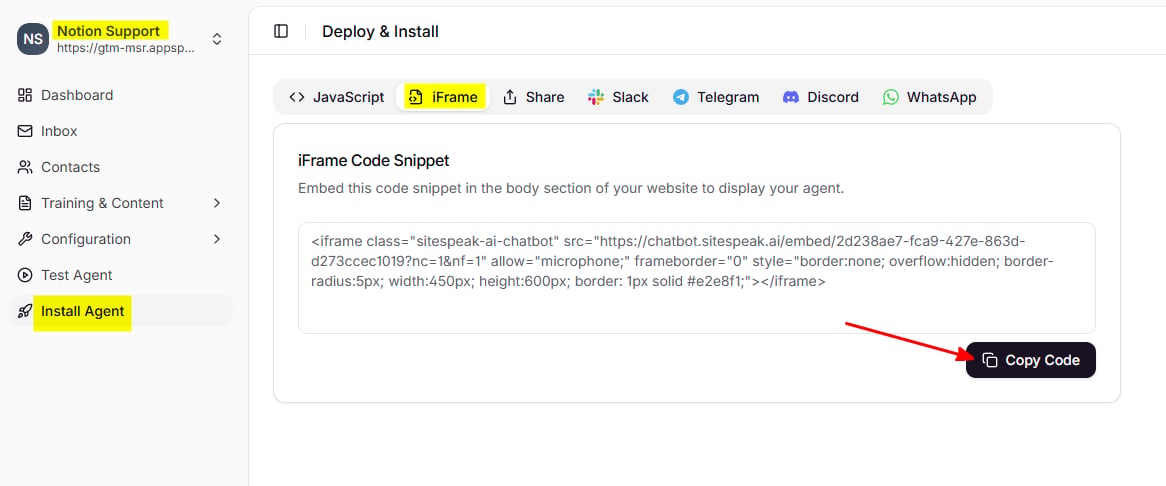
In SiteSpeakAI
- Select your AI support agent from the dropdown menu at the top of the dashboard
- Click on the Install Agent section in the sidebar
- Click on the iFrame tab
- Click the Copy Code button to copy your iFrame code snippet
In Notion
- Go to the Notion page where you would like to add your AI support agent
- Type /embed and press Enter to add an embed block
- In the modal that appears, paste the iFrame code snippet you copied from SiteSpeakAI
- Click Embed link to add the AI support agent to your page
Use cases for Notion AI support agents
Internal knowledge base: Add an AI support agent trained on your company policies, procedures, and FAQs to help employees find answers quickly. Client portals: Embed an AI support agent in shared Notion pages to provide 24/7 support to your clients without them needing to contact you directly. Onboarding documentation: Help new team members get up to speed faster by adding an AI support agent that can answer questions about your processes and tools. Product documentation: Make your product docs more interactive by letting users ask questions and get instant answers.Customizing the embed size
You can adjust the size of your AI support agent embed by modifying the width and height values in the iFrame code before pasting it into Notion. The default size works well for most pages, but you may want to make it larger for a more prominent chat experience.Troubleshooting
AI support agent not displaying? Make sure you’re using the iFrame code (not the standard JavaScript widget code). Notion only supports iFrame embeds. Embed appears too small? You can adjust the width and height parameters in the iFrame code before embedding, or resize the block directly in Notion. Changes not showing? Try refreshing the Notion page or clearing your browser cache. Notion may cache embedded content.Ready to automate your customer service with AI?
Join over 1000+ businesses, websites and startups automating their customer service and other tasks with a custom trained AI agent.